.

Overview

  • What is R?
  • Installing R and RStudio
  • R objects
  • Packages and help pages
  • R notation

Illustration adopted from Allison Horst

What is R?

So … what is R programming?

  • R is a language + an eco-system
    • a free and open-source programming language
    • statistical analysis, graphics representation, and reporting
    • an eco-system of many high-quality user-contributed libraries/packages
    • freely available under the GNU General Public License, and pre-compiled binary versions are provided for various operating systems (e.g., Linux, Windows, and Mac)
  • Before, R is known for its statistical analysis toolkits
  • Nowadays R is capable of many other tasks
    • tools that facilitates the whole data analysis workflow
    • tools for web technology
    • even this presentation is made in R!
    • also our class website is entirely built in R!

The History of R programming


Uses of R programming


Source: DataFlair

Why R for future economists and analysts?


Reading assingment

“R is a powerful, flexible, and free software environment that allows economists to analyze data, estimate models, and visualize results in a reproducible way.”

Installing R and RStudio

Installing R and RStudio on Windows


Installing R and RStudio on Mac/MacOS


RStudio interface

RStudio interface: Console window

  • located in the bottom-left
  • where you often will find the output of your coding and computations

RStudio interface: Source window

  • located in the top-left
  • source can be understood as any type of file, e.g. data, programming code, notes, etc.
  • edit script, text, markdown, website, others

RStudio interface: Environment/ History/ Connections/ Tutorials

  • located in the top-right
  • Environment: shows saved R objects
  • History: computation you run in the console will be stored
  • Connections: allows the user to tab into external databases directly
  • Tutorials: additional materials to learn R and RStudio

RStudio interface: Files/ Plots/ Packages/ Help/ Viewer

  • located in the bottom-right

R objects and packages

R Objects

  • You can consider R objects as saving information

  • e.g., text, number, matrix, vector, dataframe

  • In another words everything in R is an object

R objects

  • Objects in R are assigned a value using ←
a1 <- 10
a1
[1] 10


a2 <- 20
a2
[1] 20


a3 <- c(10, 20, 30)
a3
[1] 10 20 30
a1 + a2
[1] 30


st_name <- "christopher"
st_age <- 23
st_sex <- "male"
student <- c(st_name, st_age, st_sex)

student
[1] "christopher" "23"          "male"       

R packages

  • Collection of functions that load into your working environment.

  • A package contains code that other R users have prepared for the community.

  • Installing a package

install.packages("tidyverse")
  • Loading a package
library(tidyverse)

Functions

R functions

  • R comes with built-in functions
  • For example, you can round a number with round function
```{r}
round(3.1415)
```
[1] 3
```{r}
factorial(3)
```
[1] 6

Arguments

  • data that you pass into the function is called the function’s argument
  • Linking functions together, R resolves them from innermost operation to the outermost

die <- 1:6

mean(1:6)
## 3.5

mean(die)
## 3.5

round(mean(die))
## 4

Arguments

  • use args functions if you are not sure with the argument’s name in a function
  • some arguments are optional
    • they come with a default value
    • e.g., digits is already set to 0
```{r}
args(round)
```
function (x, digits = 0, ...) 
NULL

Sample with replacements

  • sample(x, size, replace = FALSE, prob = NULL)
  • sample will return size elements from the vector
  • sample takes two arguments: a vector named x and a number named size
```{r}
sample(x = 1:4, size = 2)
```
[1] 2 1

Sample with replacements

  • by default sample builds a sample without replacement
  • replace = TRUE causes sample to sample with replacement
```{r}
die <- 1:6

sample(x = die, size = 2, replace = TRUE)
```
[1] 2 5

Function constructor

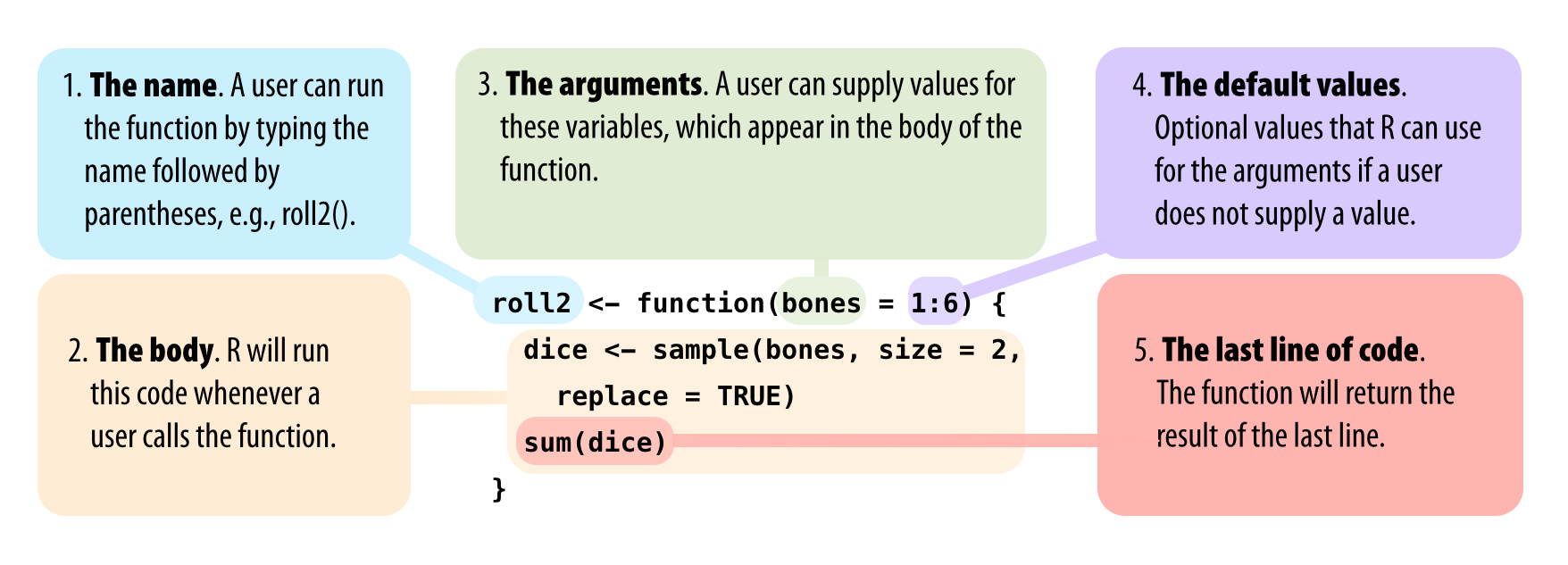
  • functions in R has three basic parts: name, body of code, and set of arguments
```{r}
my_function <- function(){}
```

Function constructor

  • function will build a function between braces
```{r}
roll <- function() {
  die <- 1:6
  dice <- sample(die, size = 2, replace = TRUE)
  sum(dice)
}
```

Function constructor

R notation

Selecting values

  • R has notation for selecting values from R objects
  • data[row, column]
```{r}
gapminder_dta <- gapminder::gapminder

gapminder_dta[1, ]
```
# A tibble: 1 × 6
  country     continent  year lifeExp     pop gdpPercap
  <fct>       <fct>     <int>   <dbl>   <int>     <dbl>
1 Afghanistan Asia       1952    28.8 8425333      779.

Selecting values

  • R has notation for selecting values from R objects
  • data[row, column]
```{r}
gapminder_dta[, 2]
```
# A tibble: 1,704 × 1
   continent
   <fct>    
 1 Asia     
 2 Asia     
 3 Asia     
 4 Asia     
 5 Asia     
 6 Asia     
 7 Asia     
 8 Asia     
 9 Asia     
10 Asia     
# ℹ 1,694 more rows

Selecting values

  • R has notation for selecting values from R objects
  • data[row, column]
```{r}
gapminder_dta[3, 2]
```
# A tibble: 1 × 1
  continent
  <fct>    
1 Asia